Range Slider Card
A dual-thumb slider for selecting a low and high value within configurable bounds.
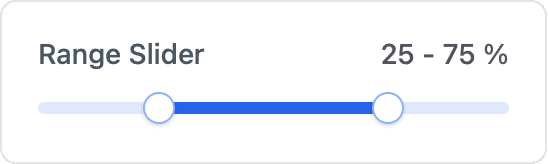
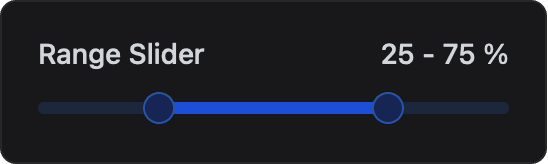
ESP-DASH Pro feature. This functionality is available only in the commercial edition of ESP-DASH.The range slider card lets the user select a range, defined by a low and a high value, with a dual-thumb slider. Use it for thresholds, alarm windows, filters or any setting that needs a lower and an upper limit.
Constructor
template <typename T = int>
dash::RangeSliderCard<T>(ESPDash& dashboard, const char* name, T minValue, T maxValue, T step = 1, const char* unit = "");
Template parameters
Prop
Type
Parameters
Prop
Type
dash::RangeSliderCard<uint8_t> rangeSlider(dashboard, "Range Slider", 0, 100, 1, "%");An overload without the dashboard argument creates the card without attaching it to a dashboard; attach it later with dashboard.add(card).
The dash::Range type
The card's value is a dash::Range<T>, which holds a low and a high value. The constructor orders its arguments, so low() is never greater than high().
Prop
Type
Callback
void onChange(std::function<void(const dash::Range<T>& range)> callback);The callback fires when the user moves either thumb. Changes are debounced in the browser and sent about 300 ms after the user stops moving. range is the new selection. Call setValue() and dashboard.sendUpdates() inside the callback to store the range and keep the dashboard in sync.
rangeSlider.onChange([](const dash::Range<uint8_t>& range) {
  Serial.printf("Range: %s\n", range.to_string().c_str());
  rangeSlider.setValue(range);
  dashboard.sendUpdates();
});
Methods
setValue()
bool setValue(dash::Range<T> value);Sets the selected range. If the range lies entirely below the minimum or entirely above the maximum, both ends are set to that bound. Returns true if the value changed.
rangeSlider.setValue({25, 75});value()
const dash::Range<T>& value() const;Returns the selected range.
const dash::Range<uint8_t>& range = rangeSlider.value();
Serial.printf("Low: %u, High: %u\n", range.low(), range.high());
setMin()
bool setMin(T minValue);Sets the lowest selectable value. If the current range lies entirely below the new minimum, it is moved to the minimum. Returns true if the minimum changed.
setMax()
bool setMax(T maxValue);Sets the highest selectable value. If the current range lies entirely above the new maximum, it is moved to the maximum. Returns true if the maximum changed.
setStep()
bool setStep(T step);Sets the increment between selectable values. Returns true if the step changed.
setUnit()
bool setUnit(const char* unit);Sets the unit label. Returns true if the unit changed.
rangeSlider.setUnit("°C");min(), max(), step(), unit()
T min() const;
T max() const;
T step() const;
const char* unit() const;
Return the current minimum, maximum, step and unit.
Example
#include <Arduino.h>
#include <WiFi.h>
#include <AsyncTCP.h>
#include <ESPAsyncWebServer.h>
#include <ESPDashPro.h>

AsyncWebServer server(80);
ESPDash dashboard(server);

dash::RangeSliderCard<int> comfortRange(dashboard, "Comfort Range", 10, 35, 1, "°C");

void setup() {
  Serial.begin(115200);
  // ... connect to WiFi

  comfortRange.setValue({20, 24});
  comfortRange.onChange([](const dash::Range<int>& range) {
    Serial.printf("Comfort range: %d to %d\n", range.low(), range.high());
    comfortRange.setValue(range);
    dashboard.sendUpdates();
  });

  server.begin();
}

void loop() {
  // ...
}
Notes
- The card stores the
unitpointer and does not copy the string. Pass a string literal or a buffer that remains valid for the lifetime of the card. setValue()does not clamp a range that only partly exceeds the bounds. Validate values from other sources before passing them to the card.