Input Card
Collect text or numeric input from the dashboard with typed parsing using dash::InputCard.
ESP-DASH Pro feature. This functionality is available only in the commercial edition of ESP-DASH.The input card provides a text field on the dashboard. The library parses the entered text into the card's type, so you can collect strings, integers or floating-point numbers, for example a device name, a threshold or a calibration offset.
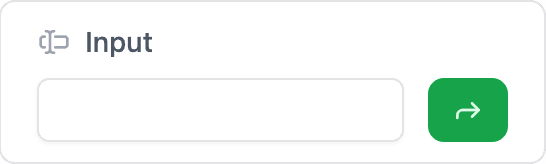
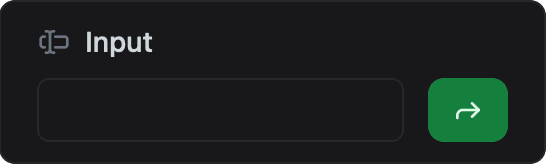
Constructor
dash::InputCard<T, Precision> card(dashboard, name, placeholder);Prop
Type
Template parameters:
Prop
Type
dash::InputCard text(dashboard, "Device name");                      // dash::string
dash::InputCard<int> threshold(dashboard, "Threshold", "0–100");
dash::InputCard<float, 3> offset(dashboard, "Offset", "°C");
An overload without the dashboard argument creates the card without attaching it to a dashboard; attach it later with dashboard.add(card).
Callback
void onChange(std::function<void(const std::optional<T>& value)> callback);The callback fires when the user submits a value on the dashboard. The parameter type is const std::optional<T>&, where T is the card's value type:
- For integral and floating-point types, the text is parsed into
T. If the field is empty or the text cannot be parsed, the callback receivesstd::nullopt. - For
dash::stringandconst char*, the callback receives the text as entered. It receivesstd::nulloptonly if the dashboard sends no value.
The card does not update its own value when the callback fires. Call setOptionalValue(value) and then dashboard.sendUpdates() inside the callback to show the accepted value on the dashboard.
dash::InputCard<int> threshold(dashboard, "Threshold");

// in setup()
threshold.onChange([](const std::optional<int>& value) {
  if (value) {
    Serial.printf("Threshold: %d\n", *value);
  } else {
    Serial.println("Invalid or empty input");
  }
  threshold.setOptionalValue(value);
  dashboard.sendUpdates();
});
Methods
setValue()
bool setValue(T value);Sets the value shown in the field. Returns true if the value changed.
setOptionalValue()
bool setOptionalValue(std::optional<T> value);Sets the value if value holds one, or clears it if value is std::nullopt. Use it to pass the callback argument back to the card. Returns true if the value changed.
value()
const T& value() const;Returns the current value. Call it only when hasValue() returns true.
hasValue()
bool hasValue() const;Returns true if a value has been set.
optional()
const std::optional<T>& optional() const;Returns the current value as a std::optional<T>, empty if no value is set.
removeValue()
bool removeValue();Clears the value. Returns true if a value was removed.
setPlaceholder()
bool setPlaceholder(const char* placeholder);Sets the placeholder text shown in the empty field. Returns true if the placeholder changed.
placeholder()
const char* placeholder() const;Returns the current placeholder text.
Example
#include <Arduino.h>
#include <WiFi.h>              // ESP32; use the networking headers for your board
#include <AsyncTCP.h>
#include <ESPAsyncWebServer.h>
#include <ESPDashPro.h>

AsyncWebServer server(80);
ESPDash dashboard(server);

dash::InputCard<dash::string> deviceName(dashboard, "Device name", "Enter a name");

void setup() {
  Serial.begin(115200);
  // ... connect to Wi-Fi

  deviceName.onChange([](const std::optional<dash::string>& value) {
    Serial.printf("Device name: %s\n", value.value_or("").c_str());
    deviceName.setOptionalValue(value);
    dashboard.sendUpdates();
  });

  deviceName.setValue("esp-node-1");
  server.begin();
}

void loop() {
  // ...
}
Notes
- With
T = const char*, the pointer passed to the callback refers to the incoming message buffer. Copy the text, or usedash::string, if you need it after the callback returns. - The card stores the
placeholderpointer and does not copy the string. Pass a string literal or a buffer that outlives the card.