Custom Title
Set the page title of the ElegantOTA Pro portal that the browser displays in its tab.
ElegantOTA Pro feature. This functionality is available only in the commercial edition of ElegantOTA.setTitle() sets the title of the portal page. The browser displays it in the tab and window title and uses it for bookmarks, which helps you distinguish the portals of several devices.
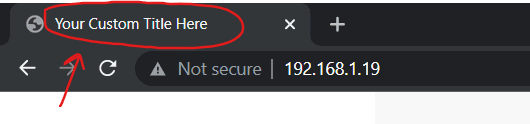
Set the title
ElegantOTA.setTitle("OTA Update - XYZ Inc");Prop
Type
If no title is set, the page title is OTA.
Do not use double quotes (") or backslashes (\) in the title. The value is embedded in the JSON that the portal loads without escaping, and these characters prevent the portal from loading its device information.
Example
#include <ElegantOTAPro.h>

// ... web server declaration

void setup() {
  // ... connect to Wi-Fi

  ElegantOTA.setTitle("OTA Update - XYZ Inc");
  ElegantOTA.begin(&server);

  server.begin();
}

void loop() {
  server.handleClient();
  ElegantOTA.loop();
}