Parameters
Build a configuration page for the captive portal in C++ with NetWizardParameter, and read the submitted values in the onConfig callback.
Parameters let you collect application settings during WiFi setup, such as MQTT credentials, user data or device options. Each NetWizardParameter you declare appears as a field on the configuration page of the captive portal, in declaration order. You can add as many parameters as you need and control the layout with headers, dividers and spacers.
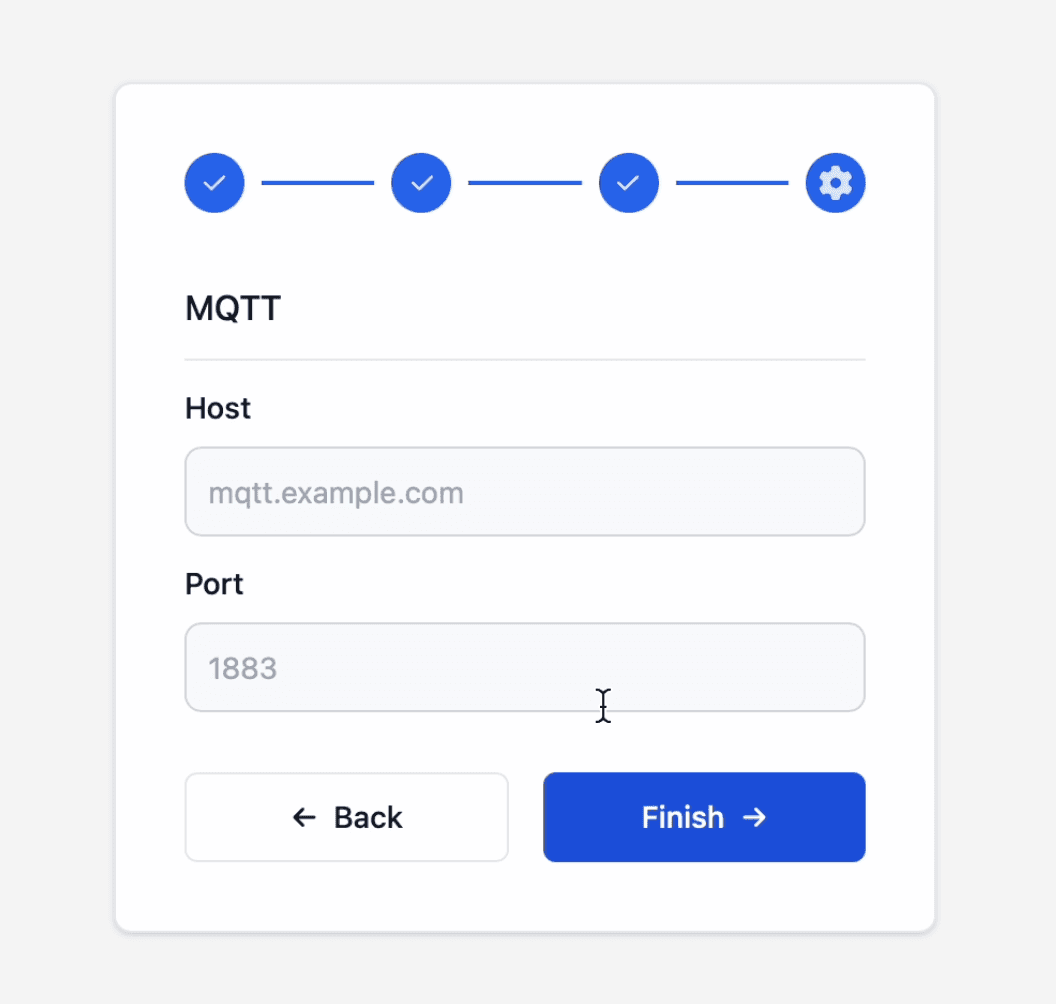
The configuration page is hidden automatically when the sketch defines no parameters.
Parameter types
| Type | Constant | Edition |
|---|---|---|
| Header | NW_HEADER | Lite and Pro |
| Divider | NW_DIVIDER | Lite and Pro |
| Spacer | NW_SPACER | Lite and Pro |
| Input | NW_INPUT | Lite and Pro |
| Password Input | NW_PASSWORD_INPUT | Pro |
| Toggle | NW_TOGGLE | Pro |
| Textarea | NW_TEXTAREA | Pro |
Constructor
NetWizardParameter(NetWizard* parent, const int type,
                   const char* name = "", const char* value = "",
                   const char* placeholder = "", bool required = true);
The constructor is overloaded so that trailing arguments can be omitted; the defaults are shown above.
Prop
Type
NetWizard Pro adds overloads that take an int or float initial value instead of const char*, for example for toggles:
NetWizardParameter(NetWizard* parent, const int type, const char* name, int value,
                   const char* placeholder = "", bool required = true);
NetWizardParameter(NetWizard* parent, const int type, const char* name, float value,
                   const char* placeholder = "", bool required = true);
Declare parameters globally, after the NetWizard instance:
NetWizard NW(&server);

NetWizardParameter nw_host(&NW, NW_INPUT, "MQTT Host", "", "mqtt.example.com");

void setup() {
  // ...
}
A parameter registers itself with NetWizard when it is constructed and removes itself when it is destroyed. To add or remove a parameter at runtime, create it with new and remove it with delete.
Required and optional parameters
Optional parameters are available in NetWizard v1.2.0 and later.
All parameters are required by default: the user must fill in every input before finishing the setup. To make a parameter optional, pass false as the sixth constructor argument:
NetWizardParameter nw_name(&NW, NW_INPUT, "Name", "Value", "Placeholder", false);You can also change the setting at runtime with setRequired():
nw_name.setRequired(false);Receive submitted values
When the user finishes the setup in the portal, NetWizard writes the submitted values to the corresponding NetWizardParameter objects and then calls the onConfig callback.
void onConfig(std::function<bool()> callback);Return true to accept the submission or false to reject it. When the callback returns false, the portal reports the request as invalid. If no callback is registered, every submission is accepted.
void setup() {
  // ...
  NW.onConfig([&]() {
    String host = nw_host.getValueStr();
    if (host.length() == 0) {
      return false;  // reject the submission
    }
    // validate, process or store the values
    return true;     // accept the submission
  });
  // ...
}
Values are not persisted
Parameter values are held in RAM only and are lost when the device restarts. Save them to persistent storage in your onConfig callback if your application needs them after a reboot. The submitted values are written to the parameters before the callback runs, and they are not reverted when the callback returns false.
Methods
getValueStr()
const String& getValueStr();Returns the value of a text-based parameter.
getValue()
void getValue(String& value);
void getValue(int& value);    // NetWizard Pro
void getValue(float& value);  // NetWizard Pro
Copies the value into value. The no-argument overload const String& getValue() is deprecated; use getValueStr() instead.
getValueInt() and getValueFloat()
int getValueInt();      // NetWizard Pro
float getValueFloat();  // NetWizard Pro
Return the value of a parameter created with an int or float value.
setValue()
void setValue(const String& value);
void setValue(const char* value);
void setValue(int value);    // NetWizard Pro
void setValue(float value);  // NetWizard Pro
Sets the value shown in the portal.
getPlaceholder() and setPlaceholder()
String getPlaceholder();
void setPlaceholder(const char* placeholder);
Read or change the placeholder text.
setRequired()
void setRequired(bool required);Marks the parameter as required (true) or optional (false).
getType()
int getType();Returns the parameter type constant, for example NW_INPUT.
Notes
- The parameter stores the
namepointer and does not copy the string. Pass a string literal or a buffer that outlives the parameter. - Only parameters you declare appear on the configuration page; WiFi credentials are handled separately by the portal.